Vahan Parivahan भारत सरकार के परिवहन मंत्रालय द्वारा शुरू किया गया एक ऑनलाइन पोर्टल है। यह देश भर में वाहन पंजीकरण, ड्राइविंग लाइसेंस और अन्य परिवहन संबंधित सेवाओं को ऑनलाइन उपलब्ध कराता है। यह पोर्टल नागरिकों को घर बैठे विभिन्न परिवहन सेवाओं का लाभ उठाने में मदद करता है।
इस पोर्टल के माध्यम से आप वाहन पंजीकरण, ड्राइविंग लाइसेंस, वाहन के चालान, परमिट, टैक्स और अन्य सेवाओं से संबंधित जानकारी प्राप्त कर सकते हैं। यह पूरी तरह से डिजिटल प्रणाली है जिससे परिवहन सेवाओं में पारदर्शिता आई है।
Services like booking, renewal, status check, and verification for learner or driving licenses.





All vehicle related registration, tax, permit and certificate services.

विषय सूची
- Vahan Parivahan क्या है?
- उपलब्ध सेवाएं
- पोर्टल के लाभ
- लाइसेंस के प्रकार
- ड्राइविंग लाइसेंस आवेदन
- ड्राइविंग लाइसेंस स्टेटस चेक
- ड्राइविंग लाइसेंस डाउनलोड
- ड्राइविंग लाइसेंस नवीनीकरण
- डुप्लीकेट ड्राइविंग लाइसेंस
- ड्राइविंग लाइसेंस शुल्क
- गाड़ी नंबर से मालिक की जानकारी
- वाहन पंजीकरण ऑनलाइन
- वाहन चालान चेक करें
- RC (रजिस्ट्रेशन सर्टिफिकेट) डाउनलोड
- हेल्पलाइन और संपर्क
- सामान्य प्रश्न
Vahan Parivahan क्या है?
Vahan Parivahan का अर्थ
Vahan Parivahan भारत सरकार के सड़क परिवहन और राजमार्ग मंत्रालय (MoRTH) द्वारा शुरू किया गया एक ऑनलाइन पोर्टल है। यह पोर्टल नागरिकों को वाहन पंजीकरण, ड्राइविंग लाइसेंस, परमिट और अन्य परिवहन संबंधित सेवाओं को ऑनलाइन प्राप्त करने की सुविधा प्रदान करता है।
Vahan Parivahan का उद्देश्य
इस पोर्टल का मुख्य उद्देश्य परिवहन सेवाओं को डिजिटल बनाना और नागरिकों को घर बैठे सुविधाएं प्रदान करना है। इससे लोगों का समय बचता है और परिवहन कार्यालयों में होने वाली भीड़ और भ्रष्टाचार में कमी आती है।
महत्वपूर्ण बातें
- Vahan Parivahan पोर्टल पर कई सेवाएं निशुल्क उपलब्ध हैं
- आप अपने वाहन की पूरी जानकारी ऑनलाइन देख सकते हैं
- ड्राइविंग लाइसेंस के लिए ऑनलाइन आवेदन कर सकते हैं
- वाहन चालान ऑनलाइन चेक और भुगतान कर सकते हैं
- RC (रजिस्ट्रेशन सर्टिफिकेट) डाउनलोड कर सकते हैं
Vahan Parivahan पोर्टल पर उपलब्ध सेवाएँ
वाहन पंजीकरण ऑनलाइन
नए वाहनों का पंजीकरण और पुराने वाहनों का नवीनीकरण
ड्राइविंग लाइसेंस ऑनलाइन
नया लर्निंग लाइसेंस, परमानेंट लाइसेंस और नवीनीकरण
चालान जांच मुफ्त
वाहन चालान की स्थिति और ऑनलाइन भुगतान
RC डाउनलोड मुफ्त
रजिस्ट्रेशन सर्टिफिकेट (RC) की डिजिटल कॉपी डाउनलोड
वाहन विवरण खोज मुफ्त
नंबर प्लेट से वाहन की पूरी जानकारी
परमिट सेवाएं ऑनलाइन
राष्ट्रीय परमिट, राज्य परमिट और अन्य परमिट
वाहन कर ऑनलाइन
वाहन कर का ऑनलाइन भुगतान
डीलर सेवाएं ऑनलाइन
वाहन डीलरों के लिए पंजीकरण और सेवाएं
Vahan Parivahan पोर्टल के लाभ
Driving Licence Eligibility Criteria
ड्राइविंग लाइसेंस के लिए न्यूनतम आयु आवश्यकता
- लर्नर लाइसेंस (गैर-व्यावसायिक): 16 वर्ष (50cc तक के मोपेड के लिए) या 18 वर्ष (मोटरसाइकिल/कार के लिए)
- स्थायी ड्राइविंग लाइसेंस (गैर-व्यावसायिक): 18 वर्ष (लर्नर लाइसेंस के 30 दिन बाद प्राप्त होता है )
- व्यावसायिक ड्राइविंग लाइसेंस (ट्रक, बस, टैक्सी): 20 वर्ष (न्यूनतम शैक्षिक योग्यता: 8वीं पास)
अन्य पात्रता शर्तें
- आवेदक शारीरिक और मानसिक रूप से स्वस्थ होना चाहिए
- व्यावसायिक लाइसेंस के लिए 40 वर्ष से अधिक आयु के आवेदकों को मेडिकल सर्टिफिकेट (फॉर्म 1A) जमा करना होगा
- आवेदक को ट्रैफिक नियमों और सड़क संकेतों की जानकारी होनी चाहिए
ड्राइविंग लाइसेंस के प्रकार
दो मुख्य प्रकार के लाइसेंस
ड्राइविंग लाइसेंस दो प्रकार के होते हैं - एक लर्नर लाइसेंस और दूसरा स्थायी ड्राइविंग लाइसेंस। यदि आपके पास ड्राइविंग लाइसेंस नहीं है, तो आपको पहले लर्नर लाइसेंस के लिए आवेदन करना होगा। लर्नर लाइसेंस प्राप्त होने के 30 दिनों के बाद, आप स्थायी ड्राइविंग लाइसेंस के लिए आवेदन कर सकते हैं।
लर्नर लाइसेंस
यह एक अस्थायी लाइसेंस है जो गाड़ी चलाना सीखने के लिए दिया जाता है। यह 6 महीने के लिए वैध होता है।
स्थायी ड्राइविंग लाइसेंस
यह एक स्थायी लाइसेंस है जो लर्नर लाइसेंस के 30 दिन बाद ड्राइविंग टेस्ट पास करने पर मिलता है।
अंतर्राष्ट्रीय ड्राइविंग परमिट
विदेशों में गाड़ी चलाने के लिए यह परमिट आवश्यक है।
Driving Licence Online कैसे बनवाएं?
चरण 1: Sarathi Parivahan वेबसाइट पर जाएं
ड्राइविंग लाइसेंस बनवाने के लिए सबसे पहले आपको Sarathi Parivahan के आधिकारिक वेबसाइट https://parivahan.gov.in पर जाना होगा।
Visit Parivahan Portal
चरण 2: ड्राइविंग लाइसेंस सेवाएं चुनें
वेबसाइट के होम पेज पर "ऑनलाइन सेवाएँ" अनुभाग के अंतर्गत जाकर आपको ड्राइविंग लाइसेंस संबंधी सेवाएँ का चयन करना होगा।
चरण 3: राज्य और RTO चुनें
फिर इसके बाद एक और नया पेज खुल कर आ जाएगा जहां पर आपको उपलब्ध विकल्पों में से अपना राज्य और आरटीओ को चुनना होगा।
चरण 4: Apply for Learner Licence चुनें
आपके सामने निम्न प्रकार के विकल्प होंगे:
- "Apply for Learner Licence" - यदि आप पहली बार लाइसेंस के लिए आवेदन कर रहे हैं
- "Apply for Driving Licence" - यदि आपके पास पहले से ही लर्नर लाइसेंस है
यदि आप पहली बार आवेदन कर रहे है तो आप "Apply for Learner Licence" पर क्लिक करना होगा।

चरण 2: फॉर्म भरें
आवश्यक जानकारी जैसे - नाम, पता, जन्मतिथि, आधार नंबर आदि दर्ज करें।
चरण 3: दस्तावेज अपलोड करें
इसके बाद आवश्यक दस्तावेज को अपलोड करें:
- आयु प्रमाण (आधार, जन्म प्रमाण पत्र, 10वीं मार्कशीट)
- पता प्रमाण (आधार, वोटर आईडी, पासपोर्ट)
- पासपोर्ट साइज फोटो
- हस्ताक्षर
चरण 4: शुल्क भुगतान करें
दस्तावेज को अपलोड करने के बाद लर्निंग लाइसेंस शुल्क का ऑनलाइन भुगतान करें।
चरण 5: परीक्षा दें
ऑनलाइन परीक्षा दें। परीक्षा में ट्रैफिक नियमों और सड़क संकेतों से संबंधित प्रश्न पूछे जाते हैं।
चरण 6: लर्निंग लाइसेंस प्राप्त करें
परीक्षा पास करने के बाद लर्निंग लाइसेंस जारी हो जाएगा। 30 दिनों के बाद आप परमानेंट लाइसेंस के लिए आवेदन कर सकते हैं।
महत्वपूर्ण सुझाव
- लर्निंग लाइसेंस 6 महीने के लिए वैध होता है
- परमानेंट लाइसेंस के लिए लर्निंग लाइसेंस के कम से कम 30 दिन बाद आवेदन करें
- परमानेंट लाइसेंस के लिए ड्राइविंग टेस्ट देना होगा
- सभी दस्तावेज सही और स्पष्ट होने चाहिए
Driving License Status कैसे चेक करें?
चरण 1: Sarathi Parivahan वेबसाइट पर जाएं
सबसे पहले आपको Sarathi Parivahan के आधिकारिक वेबसाइट https://parivahan.gov.in पर जाना होगा।
चरण 2: ड्राइविंग लाइसेंस सेवाएं चुनें
वेबसाइट के होम पेज पर "ऑनलाइन सेवाएँ" अनुभाग के अंतर्गत जाकर आपको ड्राइविंग लाइसेंस संबंधी सेवाएँ, का चयन करना होगा।
चरण 3: राज्य चुनें
इसके बाद आपसे आपके ड्रॉपडाउन से अपना राज्य की जानकारी को चुनना होगा।
चरण 4: Application Status चुनें
अब आपके सामने कई सारे विकल्प खुल जाएगा जिसमे आपको "Application Status" विकल्प पर क्लिक करना होगा।

चरण 5: विवरण दर्ज करें
इसके बाद आपको अपनी वर्तमान स्थिति जांचने के लिए अपना आवेदन नंबर, जन्म तिथि और प्रदर्शित कैप्चा दर्ज करें।
नोट
इस तरह से आप अपना ड्राइविंग लाइसेंस का स्टेटस देख सकते हैं। यदि आपने अपना ड्राइविंग लाइसेंस हाल ही में Renewal करवाया है, तो भी आप इस प्रक्रिया की मदद से अपने Renewal Status को देख सकते हैं।
Driving License Download कैसे करें?
चरण 1: Sarathi Parivahan वेबसाइट पर जाएं
सबसे पहले आपको Sarathi Parivahan के आधिकारिक वेबसाइट https://parivahan.gov.in पर जाना होगा।
चरण 2: ड्राइविंग लाइसेंस सेवाएं चुनें
वेबसाइट के होम पेज पर "ऑनलाइन सेवाएँ" अनुभाग के अंतर्गत जाकर आपको "ड्राइविंग लाइसेंस संबंधी सेवाएँ" का चयन करना होगा।
चरण 3: राज्य चुनें
इसके बाद आपसे ड्रॉपडाउन से अपना राज्य की जानकारी को चुनना होगा।
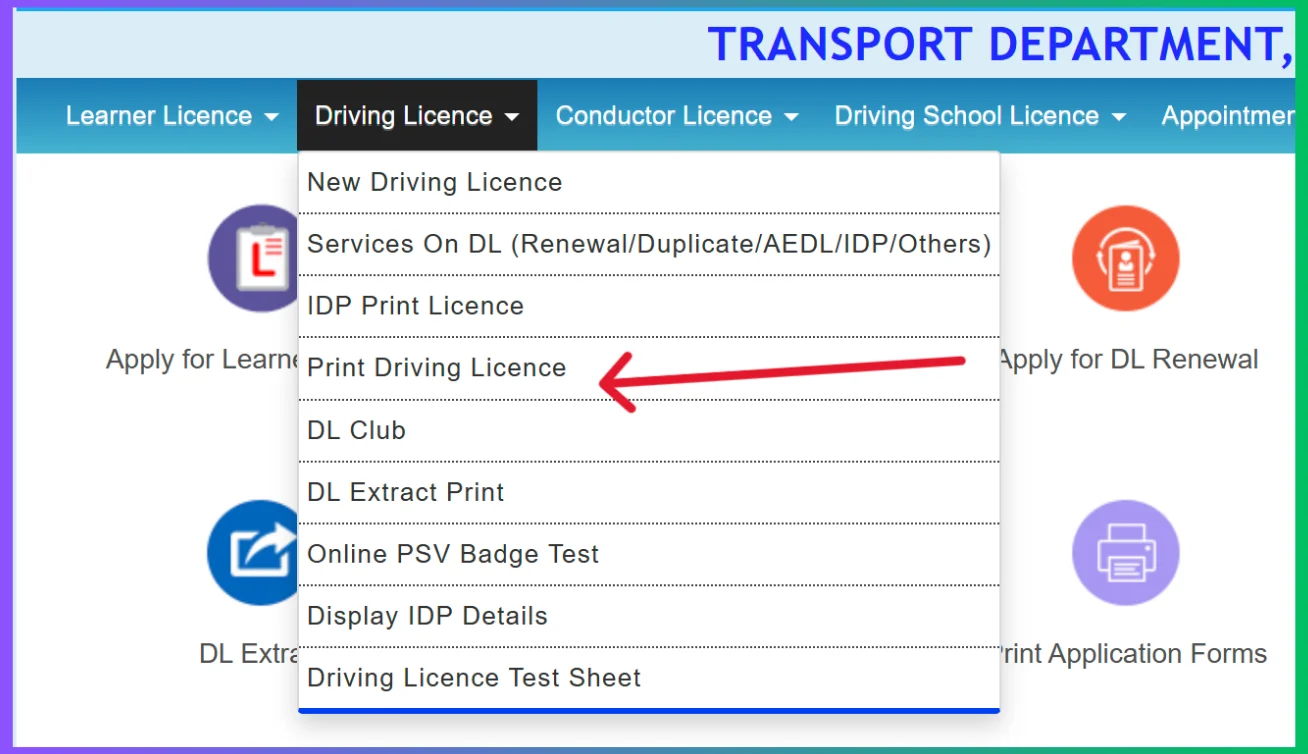
चरण 4: प्रिंट ड्राइविंग लाइसेंस चुनें
आपको ड्राइविंग लाइसेंस मेनू में "प्रिंट ड्राइविंग लाइसेंस" पर क्लिक करना होगा।
चरण 5: विवरण दर्ज करें
अपना डीएल आवेदन नंबर और जन्मतिथि दर्ज करें, फिर सबमिट पर क्लिक करें।
चरण 6: लाइसेंस डाउनलोड करें
फिर इसके बाद आपको लाइसेंस विकल्प में प्रिंट ड्राइविंग लाइसेंस दिखाई देगा। आपको इस विकल्प पर क्लिक करके इसे PDF के रूप में सहेजने या डाउनलोड कर सकते हैं।
Learner License Download करने के लिए
उसी सारथी डैशबोर्ड पर एक "Learner License" मेनू के अंतर्गत "प्रिंट लर्नर लाइसेंस (फॉर्म -3)" विकल्प दिखायी देगा। आपको उस विकल्प को चुनना होगा। अपना आवेदन/लाइसेंस नंबर, मोबाइल नंबर और जन्मतिथि दर्ज करें, फिर इसे डाउनलोड या प्रिंट करें।
Driving License Renewal कैसे करें?
नवीनीकरण की महत्वपूर्ण जानकारी
आप ड्राइविंग लाइसेंस नवीनीकरण (Driving Licence Renewal) के लिए उसकी समाप्ति से एक महीने पहले तक आवेदन कर सकते हैं। यदि नवीनीकरण में पांच साल से अधिक की देरी होती है, तो आपको नई लाइसेंस के लिए आवेदन प्रक्रिया का पालन करना होगा। यदि आवेदन समाप्ति के 30 दिन के भीतर किया जाता है तो नवीनीकरण मूल तिथि से प्रभावी होगा। तो आप 30/- रुपये अतिरिक्त शुल्क के साथ आवेदन तिथि से मान्य होगा।
आवश्यक दस्तावेज
- ड्राइविंग लाइसेंस
- आवेदन पत्र 2
- फॉर्म 1 (गैर-परिवहन वाहनों के लिए स्व-घोषणा)
- फॉर्म 1ए(परिवहन वाहनों के लिए चिकित्सा प्रमाणपत्र)
- निर्धारित शुल्क
चरण 1: Sarathi Parivahan वेबसाइट पर जाएं
सबसे पहले आपको Sarathi Parivahan के आधिकारिक वेबसाइट https://parivahan.gov.in पर जाना होगा।
चरण 2: ड्राइविंग लाइसेंस सेवाएं चुनें
वेबसाइट के होम पेज पर "ऑनलाइन सेवाएँ" अनुभाग के अंतर्गत जाकर आपको ड्राइविंग लाइसेंस संबंधी सेवाएँ का चयन करना होगा।
चरण 3: राज्य चुनें
इसके बाद आपसे ड्रॉपडाउन से अपना राज्य की जानकारी को चुनना होगा।

चरण 4: Driving Licence Renewal चुनें
अब आपके सामने कई सारे विकल्प खुल जाएगा जिसमे आपको "Driving Licence Renewal" विकल्प पर क्लिक करना होगा।
चरण 5: DL नंबर दर्ज करें
फिर आपको अपना ड्राइविंग लाइसेंस नंबर, जन्म तिथि और कैप्चा कोड दर्ज कर लेना है। फिर इसके बाद आपको "DL विवरण प्राप्त करें" पर क्लिक करें।

चरण 6: आगे बढ़ें
इसके बाद आपको "आगे बढ़ें" बटन पर क्लिक करके नवीनीकरण प्रक्रिया को आगे बढ़ाना होगा।
चरण 7: दस्तावेज अपलोड करें
इसके बाद आपको अपने सारे आवश्यक दस्तावेज जैसे फॉर्म 1ए, पता प्रमाण, आयु प्रमाण और पासपोर्ट आकार की तस्वीरें को अपलोड करना होगा।
चरण 8: शुल्क का भुगतान करें
इसके बाद आपको शुल्क का भुगतान ऑनलाइन कर देना है।
चरण 9: RTO जाएं
कुछ दिन बाद आपको निर्धारित तिथि पर, सत्यापन के लिए मूल दस्तावेजों के साथ अपने आरटीओ पर जाएँ। एक बार आपका सत्यापित हो जाता है तो आपका नवीनीकृत ड्राइविंग लाइसेंस आपके पंजीकृत पते पर भेज दिया जाएगा।
ऑफलाइन नवीनीकरण
अपने ड्राइविंग लाइसेंस को ऑफ़लाइन नवीनीकृत करने के लिए, निकटतम आरटीओ पर जाएँ, भरें प्रपत्र 2, और इसे आवश्यक दस्तावेजों के साथ जमा करें। नवीनीकरण शुल्क का भुगतान करें और रसीद प्राप्त करें। सत्यापन के बाद, आरटीओ से अपना नवीनीकृत लाइसेंस प्राप्त करें।
Duplicate Driving License कैसे बनवाएं?
डुप्लीकेट ड्राइविंग लाइसेंस कब बनता है?
यदि आपका ड्राइविंग लाइसेंस खो गया है या नष्ट हो गया है, या लाइसेंस क्षतिग्रस्त, विरूपित या अपठनीय है तो ही आपको डुप्लिकेट ड्राइविंग लाइसेंस (Duplicate Driving Licence) जारी किया जा सकता है।
आवश्यक दस्तावेज
- ड्राइविंग लाइसेंस नंबर
- मोबाइल नंबर
- ईमेल आईडी
- भुगतान पर्ची
- स्लॉट बुकिंग पर्ची
चरण 1: Sarathi Parivahan वेबसाइट पर जाएं
सबसे पहले आपको Sarathi Parivahan के आधिकारिक वेबसाइट https://parivahan.gov.in पर जाना होगा।
चरण 2: ड्राइविंग लाइसेंस सेवाएं चुनें
वेबसाइट के होम पेज पर "ऑनलाइन सेवाएँ" अनुभाग के अंतर्गत जाकर आपको ड्राइविंग लाइसेंस संबंधी सेवाएँ, का चयन करना होगा।
चरण 3: राज्य चुनें
इसके बाद आपसे ड्रॉपडाउन से अपना राज्य की जानकारी को चुनना होगा।
चरण 4: डुप्लीकेट DL के लिए आवेदन चुनें
अब आपके सामने कई सारे विकल्प खुल जाएगा जिसमे आपको "डुप्लीकेट DL के लिए आवेदन करें" विकल्प पर क्लिक करना होगा।
चरण 5: विवरण दर्ज करें
अपना ड्राइविंग लाइसेंस नंबर, जन्म तिथि और कैप्चा दर्ज करने के बाद आपको "DL विवरण प्राप्त करें" विकल्प पर क्लिक करना होगा।
चरण 6: व्यक्तिगत जानकारी दर्ज करें
इसके बाद पुष्टि करने के लिए आपको अपना मोबाइल नंबर, ईमेल आईडी, अपना पता और पिन कोड को दर्ज करना होगा।
चरण 7: विकल्प चुनें
इसके बाद आपके सामने "डुप्लीकेट DL जारी करना" या "DL का प्रतिस्थापन", विकल्प को सिलेक्ट करके "आगे बढ़ें" पर क्लिक कर देना है।
चरण 8: स्व-घोषणा पत्र जमा करें
आपको अपने शारीरिक फिटनेस के संबंध में स्व-घोषणा पत्र को जमा करना होगा।
चरण 9: भुगतान करें
फिर आपको कुछ आवश्यक दस्तावेज़ अपलोड करके, शुल्क का भुगतान करना होगा और रसीद के प्रिंट को निकाल लेना है।
चरण 10: अपॉइंटमेंट बुक करें
इसके बाद आपको एक अपॉइंटमेंट स्लॉट बुक करना होगा, उस दिन आपको अपने सारे दस्तावेज़ को आरटीओ में ले जान होगा। वह पर सत्यापन के बाद, आपका डुप्लीकेट या प्रतिस्थापन डीएल आपके पते पर भेज दिया जाएगा।
Driving License Fees
| सेवा | शुल्क (रुपये में) |
|---|---|
| लर्नर लाइसेंस (LL) | ₹200 |
| स्थायी ड्राइविंग लाइसेंस (DL) | ₹200 |
| ड्राइविंग लाइसेंस नवीनीकरण | ₹200 |
| डुप्लीकेट ड्राइविंग लाइसेंस | ₹250 |
| अंतर्राष्ट्रीय ड्राइविंग परमिट (IDP) | ₹1000 |
| DL में अतिरिक्त वाहन क्लास जोड़ना | ₹500 |
| ड्राइविंग टेस्ट | ₹300 |
| देर से नवीनीकरण (ग्रेस पीरियड के बाद) | ₹300 + उचित शुल्क |
Driving Licence Services – SARATHI Portal
| Service | Details |
|---|---|
| Learner's Licence (LL) Application | पहली बार लाइसेंस बनवाने के लिए आवश्यक |
| Permanent Driving Licence (DL) | ड्राइविंग टेस्ट पास करने के बाद मिलने वाला Permanent DL |
| DL Test Slot Booking | RTO में ड्राइविंग टेस्ट के लिए तारीख और समय बुक कर सकते है |
| Driving Licence Renewal | समाप्त होने वाले या समाप्त DL का नवीनीकरण |
| Duplicate Driving Licence | DL खो जाने, चोरी होने या क्षतिग्रस्त होने पर डुप्लीकेट DL बनवा सकते है |
| International Driving Permit (IDP) | विदेशों में वाहन चलाने के लिए परमिट |
| Addition of Vehicle Class | मौजूदा DL में नई वाहन श्रेणी जोड़ सकते है |
| DL Application Status Check | DL आवेदन की वास्तविक समय स्थिति ट्रैक कर सकते है |
Vahan Parivahan Portal – Key Features and Objectives
| Feature | Description |
|---|---|
| Centralised National Database | देश के सभी 1300+ RTO एक डेटाबेस से जुड़े हैं |
| Digital Document Storage | DL और RC mParivahan ऐप और DigiLocker पर स्टोर कर सकते है |
| Online Appointment Booking | बिना RTO गए DL टेस्ट और दस्तावेज सत्यापन के लिए अपॉइंटमेंट बुक कर सकते है |
| Real-Time Application Tracking | इस पोर्टल पर हर आवेदन की ऑनलाइन स्थिति देख सकते है |
| Online Fee Payment | इस पोर्टल के पेमेंट गेटवे से सुरक्षित शुल्क भुगतान कर सकते है |
Vehicle Registration Online कैसे करें?
चरण 1: Parivahan वेबसाइट पर जाएं
वाहन पंजीकरण के लिए सबसे पहले आधिकारिक वेबसाइट https://parivahan.gov.in पर जाएं।
Visit Parivahan Portalचरण 2: Online Services चुनें
होम पेज पर "Online Services" मेनू में जाएं और "Vehicle Registration" विकल्प चुनें।
चरण 3: अपना राज्य चुनें
अपने राज्य और RTO का चयन करें जहाँ आप वाहन पंजीकरण करवाना चाहते हैं।
चरण 4: आवेदन फॉर्म भरें
वाहन पंजीकरण के लिए आवश्यक सभी जानकारी जैसे - वाहन का प्रकार, निर्माता, मॉडल, इंजन नंबर, चेसिस नंबर आदि दर्ज करें।
चरण 5: दस्तावेज अपलोड करें
आवश्यक दस्तावेजों को स्कैन करके अपलोड करें:
- डीलर द्वारा दी गई फॉर्म 21
- बिक्री चालान (फॉर्म 22)
- बीमा प्रमाण पत्र
- पीयूसी प्रमाण पत्र
- आधार कार्ड
- पासपोर्ट साइज फोटो
चरण 6: शुल्क का भुगतान करें
ऑनलाइन माध्यम से पंजीकरण शुल्क का भुगतान करें (डेबिट कार्ड, क्रेडिट कार्ड, नेट बैंकिंग या UPI)।
चरण 7: स्लिप प्रिंट करें
भुगतान के बाद आवेदन की स्लिप प्रिंट करके रखें। RTO द्वारा वाहन का भौतिक निरीक्षण किया जाएगा।
नोट
- वाहन पंजीकरण के लिए निरीक्षण के लिए वाहन को RTO ले जाना आवश्यक है
- पंजीकरण प्रक्रिया में 7-15 दिन लग सकते हैं
- RC जारी होने के बाद आप इसे ऑनलाइन डाउनलोड कर सकते हैं
वाहन डिटेल्स खोजने के प्रकार
वाहन नंबर से खोज
वाहन के रजिस्ट्रेशन नंबर से मालिक, मॉडल, फ्यूल टाइप, रजिस्ट्रेशन तिथि आदि की जानकारी प्राप्त करें
इंजन नंबर से खोज
इंजन नंबर के माध्यम से वाहन की पूरी जानकारी प्राप्त करें
चेसिस नंबर से खोज
चेसिस नंबर के माध्यम से वाहन की विस्तृत जानकारी प्राप्त करें
वाहन खोज में मिलने वाली जानकारी
- वाहन मालिक का नाम
- वाहन का मॉडल और निर्माता
- रजिस्ट्रेशन तिथि
- इंजन नंबर और चेसिस नंबर
- फ्यूल टाइप (पेट्रोल/डीजल/सीएनजी/इलेक्ट्रिक)
- बीमा वैधता
- पीयूसी सर्टिफिकेट स्टेटस
- चालान स्टेटस
Vehicle Owner Details कैसे प्राप्त करें?
महत्वपूर्ण जानकारी
परिवहन विभाग ने गाड़ी नंबर से मालिक के नाम को पता करने की प्रक्रिया को बेहद ही आसान कर दिया है। नीचे दिए गए सरल चरणों का पालन करें:
चरण 1: Parivahan वेबसाइट पर जाएं
सबसे पहले आपको परिवहन विभाग की आधिकारिक वेबसाइट https://parivahan.gov.in/parivahan/ पर जाना होगा।
चरण 2: Informational Services चुनें
होमपेज पर ऊपर एक मेनू बार में "Informational Services" का विकल्प दिखेगा, उस पर क्लिक करते ही ड्रॉपडाउन मेनू ओपन होगा।

चरण 3: Know Your Vehicle Details चुनें
ड्रॉपडाउन मेनू में कई सारे विकल्प दिखाई देंगे, आपको उसमें से "Know Your Vehicle Details" पर क्लिक करना होगा।
चरण 4: लॉग इन करें
उस पर क्लिक करते ही आपके सामने एक नया पेज खुल कर आ जायेगा जहाँ आपको अपने मोबाइल नंबर की मदद से लॉग इन करना होगा।
चरण 5: OTP सत्यापन
रजिस्ट्रेशन सफलतापूर्वक पूर्ण होते ही आपको अपने मोबाइल नंबर और OTP की सहायता से सफलतापूर्वक परिवहन विभाग में लॉग इन कर लेना है।
चरण 6: वाहन नंबर दर्ज करें
लॉग इन करते ही आपके सामने "RC Status" का पेज खुल कर आ जाएगा। फिर यहाँ पर मांगी गई सभी जानकारियाँ जैसे – Vehicle Number और वेरिफिकेशन कोड आदि सही-सही दर्ज करना होगा।
चरण 7: Vahan Search करें
फिर आपको वाहन मालिक का विवरण जानने के लिए नीचे दिए गए "Vahan Search" बटन के विकल्प पर क्लिक कर देना है।
चरण 8: वाहन की पूरी जानकारी देखें
"Vahan Search" के विकल्प पर क्लिक करते ही आपके सामने उस वाहन की सारी डिटेल्स जैसे की – गाड़ी के मालिक का नाम, RTO का नाम, गाड़ी का इंश्योरेंस डिटेल्स, रजिस्ट्रेशन डेट, आदि सभी जानकारी खुल कर आ जाएगी।
मिलने वाली जानकारी
- गाड़ी के मालिक का नाम
- RTO का नाम और पता
- गाड़ी का इंश्योरेंस विवरण
- रजिस्ट्रेशन तिथि
- वाहन का मॉडल और निर्माता
- फ्यूल टाइप (पेट्रोल/डीजल/सीएनजी/इलेक्ट्रिक)
- पीयूसी सर्टिफिकेट स्टेटस
Vahan e-Challan Check & Payment कैसे चेक करें?
चरण 1: Parivahan वेबसाइट पर जाएं
चालान चेक करने के लिए सबसे पहले https://parivahan.gov.in पर जाएं।

चरण 2: Online Services चुनें
"Online Services" मेनू में "Check E-Challan" विकल्प चुनें।
चरण 3: विवरण दर्ज करें
चालान चेक करने के लिए निम्न में से कोई एक जानकारी दर्ज करें:
- वाहन नंबर
- चालान नंबर
- DL नंबर
चरण 4: चालान देखें
"Get Details" पर क्लिक करें। सभी लंबित चालान की जानकारी स्क्रीन पर दिख जाएगी।
चरण 5: चालान का भुगतान करें
चालान का भुगतान ऑनलाइन माध्यम से करें। भुगतान के बाद रसीद डाउनलोड कर लें।
चालान से बचने के उपाय
- ट्रैफिक नियमों का पालन करें
- वाहन के सभी दस्तावेज अपने पास रखें
- सीट बेल्ट और हेलमेट का उपयोग करें
- स्पीड लिमिट का पालन करें
eChallan Services
| Service | Details |
|---|---|
| Check eChallan Status | चालान नंबर, वाहन नंबर या DL नंबर से लंबित चालान खोज सकते है । |
| Pay eChallan Online | UPI, नेट बैंकिंग या कार्ड से ट्रैफिक चालान का भुगतान कर सकते है । |
| View Challan History | किसी वाहन या DL नंबर पर जारी सभी चालान देख सकते है । |
RC Download Online प्रक्रिया
चरण 1: Parivahan वेबसाइट पर जाएं
RC डाउनलोड करने के लिए सबसे पहले Parivahan वेबसाइट https://parivahan.gov.in पर जाएं।
चरण 2: Know Your Vehicle चुनें
होम पेज पर "Know Your Vehicle" विकल्प पर क्लिक करें।
चरण 3: वाहन नंबर दर्ज करें
अपने वाहन का रजिस्ट्रेशन नंबर दर्ज करें और सर्च करें।
चरण 4: RC डाउनलोड करें
वाहन की पूरी जानकारी दिखने के बाद "Download RC" या "Print RC" बटन पर क्लिक करें। RC PDF फॉर्मेट में डाउनलोड हो जाएगा।
नोट
डिजिटल RC कानूनी रूप से मान्य है। आप इसे डिजीलॉकर या mParivahan ऐप में भी सेव कर सकते हैं।
Permit & Tax Services
परमिट के प्रकार
Vahan Parivahan पोर्टल पर आप निम्न प्रकार के परमिट के लिए ऑनलाइन आवेदन कर सकते हैं:
- राष्ट्रीय परमिट (National Permit)
- राज्य परमिट (State Permit)
- अंतर्राज्यीय परमिट (Inter-State Permit)
- टेम्पररी परमिट (Temporary Permit)
Vahan Tax ऑनलाइन
Vahan पोर्टल के माध्यम से आप वाहन कर का ऑनलाइन भुगतान कर सकते हैं:
- वार्षिक वाहन कर
- जीवन भर का वाहन कर (लाइफ टैक्स)
- फिटनेस सर्टिफिकेट शुल्क
mParivahan App - एमपरिवहन ऐप
mParivahan ऐप क्या है?
mParivahan ऐप भारत सरकार का आधिकारिक मोबाइल एप्लिकेशन है जो Parivahan Sewa पोर्टल की सभी सेवाओं को मोबाइल पर उपलब्ध कराता है। आप इस ऐप के माध्यम से अपना डिजिटल DL और RC स्टोर कर सकते हैं, चालान चेक कर सकते हैं और वाहन की जानकारी प्राप्त कर सकते हैं।
mParivahan ऐप डाउनलोड कैसे करें?
Google Play Store या Apple App Store पर जाकर "mParivahan" सर्च करें और आधिकारिक ऐप डाउनलोड करें।
mParivahan ऐप डाउनलोड करेंmParivahan ऐप की विशेषताएं
- ड्राइविंग लाइसेंस और RC की डिजिटल कॉपी स्टोर करें
- ई-चालान चेक करें और ऑनलाइन भुगतान करें
- वाहन मालिक विवरण प्राप्त करें
- DL/RC आवेदन की स्थिति ट्रैक करें
- लर्नर लाइसेंस परीक्षा की तारीख बुक करें
- ड्राइविंग टेस्ट के लिए स्लॉट बुक करें
All Services Available on Vahan Parivahan Portal
Vehicle Registration Services – VAHAN Portal
Vahan Parivahan भारत सरकार के परिवहन मंत्रालय द्वारा शुरू किया गया एक ऑनलाइन पोर्टल है। यह देश भर में वाहन पंजीकरण, ड्राइविंग लाइसेंस और अन्य परिवहन संबंधित सेवाओं को ऑनलाइन उपलब्ध कराता है।
| Service | Details |
|---|---|
| New Vehicle Registration | नई गाड़ी का संबंधित राज्य RTO में पंजीकरण कराएं |
| RC Renewal | समाप्त या समाप्त होने वाले RC का नवीनीकरण करें |
| Duplicate RC | मूल RC खो जाने या क्षतिग्रस्त होने पर डुप्लीकेट RC के लिए आवेदन करें |
| Transfer of Ownership | सेकेंड हैंड वाहन खरीदते या बेचते समय स्वामित्व स्थानांतरित करें |
| Hypothecation Addition | वाहन लोन लेते समय RC में बैंक या NBFC का नाम जोड़ें |
| Hypothecation Termination | लोन चुकाने के बाद RC से बैंक का नाम हटाएं |
| Change of Address in RC | RC पर दर्ज पता अपडेट करें |
| No Objection Certificate (NOC) | दूसरे राज्य में वाहन पंजीकरण के लिए आवश्यक NOC प्राप्त करें |
| Fitness Certificate (FC) | परिवहन वाहनों के लिए अनिवार्य फिटनेस सर्टिफिकेट |
| PUC Certificate Check | PUC सर्टिफिकेट की वैधता जांचें |
| Fancy Number Booking | अपनी पसंद का VIP रजिस्ट्रेशन नंबर बुक करें |
Vehicle Registration Certificate (RC) – Fees and Charges
| Vehicle Category | New RC / Renewal Fee |
|---|---|
| Invalid Carriage | Rs. 50 |
| Motorcycle | Rs. 300 |
| Three Wheeler / Quadricycle / LMV (Non-Transport) | Rs. 600 |
| Three Wheeler / LMV (Transport) | Rs. 1,000 |
| Medium Goods/Passenger Motor Vehicle | Rs. 1,000 |
| Heavy Goods/Passenger Motor Vehicle | Rs. 1,500 |
| Imported Motor Vehicle | Rs. 5,000 |
| Imported Motorcycle | Rs. 2,500 |
| Duplicate RC / RC with Alteration | 50% of original fee |
| Transfer of Ownership / Change of Residence | 50% of original fee |
| Smart Card RC (Additional Charge) | Rs. 200 |
Fitness Certificate (FC) – Fees
| Vehicle Type | Manual Inspection | Automated Inspection |
|---|---|---|
| Motorcycle | Rs. 200 | Rs. 400 |
| Three Wheeler / LMV / Quadricycle | Rs. 400 | Rs. 600 |
| Medium / Heavy Motor Vehicle | Rs. 600 | Rs. 1,000 |
Dealer Registration Online
डीलर पंजीकरण प्रक्रिया
वाहन डीलर Parivahan पोर्टल पर ऑनलाइन पंजीकरण कर सकते हैं:
- पोर्टल पर "Dealer Registration" विकल्प चुनें
- डीलरशिप की पूरी जानकारी दर्ज करें
- आवश्यक दस्तावेज अपलोड करें
- पंजीकरण शुल्क का भुगतान करें
- सत्यापन के बाद डीलर आईडी प्राप्त करें
Driving Licence Forms
फॉर्म 1 PDF
यह फॉर्म गैर-परिवहन वाहनों (निजी वाहन) के लिए शारीरिक फिटनेस की स्व-घोषणा के लिए उपयोग किया जाता है।
फॉर्म 1APDF
यह फॉर्म परिवहन वाहनों (ट्रक, बस, टैक्सी) और 40 वर्ष से अधिक आयु के आवेदकों के लिए चिकित्सा प्रमाण पत्र के लिए आवश्यक है। सरकारी डॉक्टर से भरवाना होता है।
फॉर्म 2 PDF
यह फॉर्म लर्नर लाइसेंस या स्थायी ड्राइविंग लाइसेंस के लिए आवेदन करने हेतु उपयोग किया जाता है। इसमें आवेदक का नाम, पता, जन्मतिथि आदि जानकारी भरी जाती है।
फॉर्म 3 PDF
यह फॉर्म लर्नर लाइसेंस जारी होने पर दिया जाता है। यह लाइसेंस की अस्थायी कॉपी होती है जो 6 महीने के लिए वैध होती है।
फॉर्म 4 PDF
यह फॉर्म स्थायी ड्राइविंग लाइसेंस के लिए आवेदन करने हेतु उपयोग किया जाता है। लर्नर लाइसेंस प्राप्त होने के 30 दिन बाद इस फॉर्म से आवेदन किया जा सकता है।
फॉर्म 4A PDF
यह फॉर्म इंटरनेशनल ड्राइविंग परमिट (International Driving Permit - IDP) प्राप्त करने के लिए भरा जाता है।
फॉर्म 6A PDF
यह फॉर्म आमतौर पर ड्राइविंग लाइसेंस के नवीनीकरण (Renewal) या डुप्लीकेट ड्राइविंग लाइसेंस प्राप्त करने के लिए उपयोग किया जाता है।
फॉर्म 7 PDF
यह फॉर्म ड्राइविंग स्कूल का लाइसेंस प्राप्त करने या नवीनीकरण के लिए उपयोग किया जाता है।
फॉर्म 8 PDF
यह फॉर्म मौजूदा ड्राइविंग लाइसेंस में एक नई वाहन श्रेणी (जैसे मोटरसाइकिल से कार) जोड़ने के लिए उपयोग किया जाता है।
फॉर्म 9 PDF
यह फॉर्म समाप्त हो चुके या समाप्त होने वाले ड्राइविंग लाइसेंस के नवीनीकरण के लिए उपयोग किया जाता है।
फॉर्म 10 PDF
यह फॉर्म अंतर्राष्ट्रीय ड्राइविंग परमिट (IDP) के लिए आवेदन करने हेतु उपयोग किया जाता है। विदेशों में वाहन चलाने के लिए यह आवश्यक है।
फॉर्म 11PDF
यह फॉर्म ड्राइविंग स्कूल द्वारा दिया जाने वाला प्रशिक्षण प्रमाण पत्र है।
Vehicle Registration Forms
फॉर्म 20 PDF
यह फॉर्म नए वाहन के पंजीकरण के लिए उपयोग किया जाता है। इसमें वाहन का मॉडल, इंजन नंबर, चेसिस नंबर आदि जानकारी भरी जाती है।
फॉर्म 21 PDF
यह फॉर्म वाहन डीलर द्वारा वाहन की बिक्री के समय दिया जाता है। यह वाहन की बिक्री का प्रमाण है।
फॉर्म 22 PDF
यह फॉर्म वाहन निर्माता द्वारा जारी किया जाता है जो पुष्टि करता है कि वाहन सड़क पर चलने के लिए सुरक्षित है।
फॉर्म 25 PDF
यह फॉर्म समाप्त हो चुके वाहन पंजीकरण प्रमाण पत्र (RC) के नवीनीकरण के लिए उपयोग किया जाता है।
फॉर्म 26 PDF
यह फॉर्म मूल RC खो जाने, क्षतिग्रस्त होने या चोरी हो जाने पर डुप्लीकेट RC के लिए आवेदन करने हेतु उपयोग किया जाता है।
फॉर्म 27 PDF
यह फॉर्म वाहन को एक राज्य से दूसरे राज्य में ले जाने पर नया रजिस्ट्रेशन नंबर के लिए उपयोग किया जाता है।
फॉर्म 28 PDF
यह फॉर्म वाहन को एक राज्य से दूसरे राज्य में स्थानांतरित करने के लिए बिना आपत्ति प्रमाण पत्र (NOC) प्राप्त करने हेतु उपयोग किया जाता है।
फॉर्म 29 PDF
यह फॉर्म वाहन बेचने वाले द्वारा भरा जाता है। इसमें वाहन के हस्तांतरण की सूचना RTO को दी जाती है।
फॉर्म 30 PDF
यह फॉर्म वाहन खरीदने वाले द्वारा भरा जाता है। यह RC पर नए मालिक का नाम दर्ज कराने के लिए आवश्यक है।
फॉर्म 31 PDF
यह फॉर्म वाहन मालिक की मृत्यु हो जाने पर वाहन का स्वामित्व वारिस/उत्तराधिकारी के नाम करने के लिए उपयोग किया जाता है।
फॉर्म 32 PDF
यह फॉर्म RC पर दर्ज पता बदलने के लिए RTO को सूचित करने हेतु उपयोग किया जाता है।
फॉर्म 33 PDF
यह फॉर्म भी RC में पता परिवर्तन के लिए उपयोग किया जाता है। यह फॉर्म 32 का वैकल्पिक रूप है।
फॉर्म 34 PDF
यह फॉर्म वाहन लोन लेते समय RC में बैंक या वित्तीय संस्थान का नाम दर्ज कराने के लिए उपयोग किया जाता है।
फॉर्म 35 PDF
यह फॉर्म लोन चुकाने के बाद RC से बैंक का नाम हटाने के लिए उपयोग किया जाता है।
State-wise RTO Codes – Vahan Parivahan
हेल्पलाइन और संपर्क विवरण
Parivahan हेल्पलाइन
| टोल फ्री नंबर | 1800-111-200 (24x7) |
| ईमेल सहायता | parivahan@nic.in |
| आधिकारिक वेबसाइट | https://parivahan.gov.in |
| मोबाइल ऐप | mParivahan (Google Play Store पर उपलब्ध) |
| सोशल मीडिया | twitter: @MORTHIndia |
महत्वपूर्ण
Vahan Parivahan पोर्टल पर सभी सेवाएं सुरक्षित और विश्वसनीय हैं। किसी भी प्रकार की ऑनलाइन ठगी से बचने के लिए हमेशा आधिकारिक वेबसाइट का ही उपयोग करें।
सामान्य प्रश्न (FAQs)
प्रश्न: Vahan Parivahan पोर्टल क्या है?
उत्तर: Vahan Parivahan भारत सरकार का आधिकारिक परिवहन पोर्टल है जो वाहन पंजीकरण, ड्राइविंग लाइसेंस, चालान और अन्य परिवहन सेवाओं को ऑनलाइन उपलब्ध कराता है।
प्रश्न: क्या RC डिजिटल कॉपी कानूनी रूप से मान्य है?
उत्तर: हां, Parivahan पोर्टल से डाउनलोड की गई RC की डिजिटल कॉपी कानूनी रूप से पूरी तरह मान्य है। आप इसे मोबाइल या डिजीलॉकर में दिखा सकते हैं।
प्रश्न: ड्राइविंग लाइसेंस ऑनलाइन बनाने में कितना समय लगता है?
उत्तर: लर्निंग लाइसेंस ऑनलाइन परीक्षा पास करने के तुरंत बाद जारी हो जाता है। परमानेंट लाइसेंस के लिए आवेदन करने के बाद ड्राइविंग टेस्ट के लिए तारीख मिलती है, जिसमें 7-15 दिन लग सकते हैं।
प्रश्न: वाहन चालान ऑनलाइन कैसे चेक करें?
उत्तर: Parivahan पोर्टल पर "Online Services" -> "Check E-Challan" में जाकर वाहन नंबर, चालान नंबर या DL नंबर दर्ज करके चालान चेक कर सकते हैं।
प्रश्न: क्या mParivahan ऐप मुफ्त है?
उत्तर: हां, mParivahan ऐप Google Play Store पर मुफ्त उपलब्ध है। इस ऐप के माध्यम से आप वाहन और लाइसेंस से संबंधित सभी सेवाओं का लाभ उठा सकते हैं।
प्रश्न: वाहन पंजीकरण के लिए कौन से दस्तावेज चाहिए?
उत्तर: वाहन पंजीकरण के लिए फॉर्म 21 (डीलर से), बिक्री चालान, बीमा प्रमाण पत्र, पीयूसी प्रमाण पत्र, आधार कार्ड और पासपोर्ट साइज फोटो की आवश्यकता होती है।
प्रश्न: ड्राइविंग लाइसेंस कितने प्रकार के होते हैं?
उत्तर: ड्राइविंग लाइसेंस दो प्रकार के होते हैं - लर्नर लाइसेंस (अस्थायी) और स्थायी ड्राइविंग लाइसेंस। लर्नर लाइसेंस 6 महीने के लिए वैध होता है, जबकि स्थायी लाइसेंस लंबी अवधि के लिए जारी किया जाता है।
प्रश्न: लर्नर लाइसेंस के बाद स्थायी लाइसेंस कब बन सकता है?
उत्तर: लर्नर लाइसेंस प्राप्त होने के 30 दिनों के बाद आप स्थायी ड्राइविंग लाइसेंस के लिए आवेदन कर सकते हैं। इसके लिए आपको ड्राइविंग टेस्ट पास करना होगा।
प्रश्न: क्या RC डिजिटल कॉपी कानूनी रूप से मान्य है?
उत्तर: हां, Parivahan पोर्टल से डाउनलोड की गई RC की डिजिटल कॉपी कानूनी रूप से पूरी तरह मान्य है। आप इसे मोबाइल या डिजीलॉकर में दिखा सकते हैं।
प्रश्न: ड्राइविंग लाइसेंस नवीनीकरण के लिए कितना शुल्क लगता है?
उत्तर: ड्राइविंग लाइसेंस नवीनीकरण के लिए ₹200 का शुल्क लगता है। यदि ग्रेस पीरियड के बाद नवीनीकरण करते हैं तो अतिरिक्त शुल्क देना होगा।
प्रश्न: गाड़ी नंबर से मालिक की जानकारी कैसे प्राप्त करें?
उत्तर: Parivahan पोर्टल पर "Know Your Vehicle Details" विकल्प में जाकर वाहन नंबर दर्ज करके आप वाहन मालिक की जानकारी प्राप्त कर सकते हैं।